確か1話はニコニコ動画で見たと思うハルチカですが,2話からは有料のよう.どこかで見られないかなーとON AIR情報を調べてみると「Rakuten SHOWTIME」というところで最新話が1週無料のようです.
Rakuten SHOWTIME
(最新各話、配信後1週間無料) http://video.rakuten.co.jp/ 🏛️
早速見に行くと,
非対応デバイスのため、動画を再生できません。
ブラウザのUser-Agentを変更してアクセスしてみると,Silverlightでした.
動画を再生するためには、Silverlightのインストールが必要です。こちらから最新版のインストールをお願いいたします。
Silverlightでの動画視聴は以前Pipelightを使って試したことがありました.
このときは動画と音声がどんどんずれていって動画視聴は辛かったです.今なら改善されているかもと再度試してみました.
以前はPipelightはDebian pkgにあったのですが今はなくなっているようです.
$ w3m -dump 'https://packages.debian.org/search?keywords=pipelight&searchon=all&exact=1&suite=all§ion=all'|grep 'で検索しました' -A5
すべてのアーキテクチャで検索しました。
残念ながら、検索結果はありませんでした
━━━━━━━━━━━━━━━━━━━━━━━━━━━━━━━━━━━━━━━━━━━━━━━━━━━━━━━━━━━━━━━━━━━━━━━━━━━━━━━
公式ページを見ると導入手順が書かれていました.
今回はDebian stretchなのでこちらのページを参考に導入しました.
i386パッケージを有効にします.
$ sudo dpkg --add-architecture i386
リポジトリの鍵を入手して登録します.
wget http://repos.fds-team.de/Release.key
sudo apt-key add Release.key
pipelightのsource listを追加します.
$ sudo apt edit-sources pipelight
$ sudo cat /etc/apt/sources.list.d/pipelight.list
deb http://repos.fds-team.de/stable/debian/ stretch main
<追記>
apt-cache searchなどが一般ユーザでできなくなるので読み込み権を追加.
$ sudo chmod o+r /etc/apt/sources.list.d/pipelight.list
</追記>
パッケージ情報を更新してPipelightを導入します.
$ sudo apt update && sudo apt upgrade
$ sudo apt install pipelight-multi
プラグインデータベースを最新にします.
$ sudo pipelight-plugin --update
とりあえずPipelightの導入は完了です.続いてプラグインの有効化を行います.
ここからは以下のページを参考にします.
Pipelight | Installation 🏛️
pipelight-pluginコマンドで利用できるプラグインの種類が確認できます.
$ pipelight-plugin
Usage: pipelight-plugin [OPTIONS ...] COMMAND
Environment variables:
MOZ_PLUGIN_PATH overwrite plugin path
Options:
--accept accept all licenses
User commands:
--enable PLUGIN enable plugin
--disable PLUGIN disable plugin
--disable-all disable all plugins
--list-enabled list enabled plugins for the current user
--list-enabled-all list all enabled plugins
--show-license print license for plugin
--system-check do a system check
--help shows this help
--version shows the current version of Pipelight
Global commands (require root rights):
--create-mozilla-plugins create copies of libpipelight.so
--remove-mozilla-plugins remove copies of libpipelight.so
--unlock PLUGIN unlocks an additional plugin
--lock PLUGIN locks an additional plugin
--update update the dependency-installer script
Supported standard plugins:
silverlight5.1
silverlight5.0
silverlight4
flash
unity3d
widevine
Additional plugins (experimental):
shockwave
foxitpdf
grandstream
adobereader
hikvision
npactivex
roblox
vizzedrgr
viewright-caiway
x64-unity3d
x64-flash
今回はSilverlightを使いたいのでsilverlight5.1を有効にします.
$ sudo pipelight-plugin --enable silverlight5.1
ブラウザ(Iceweasel)で利用できるようにします,
$ sudo pipelight-plugin --create-mozilla-plugins
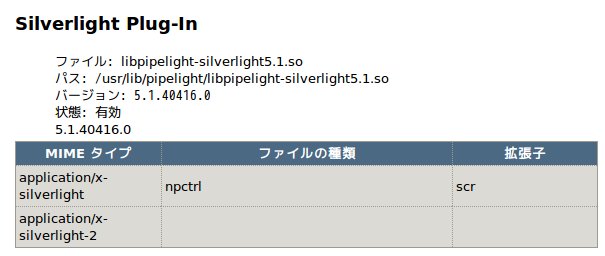
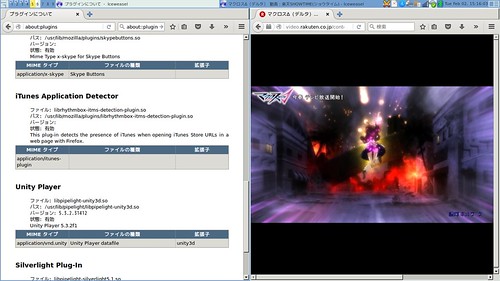
ブラウザ(Iceweasel)を起動して,about:pluginsにアクセスしてプラグインが読み込まれているか確認します.
 🏛️
🏛️
うまくいったようなので動画視聴を試してみます.2番組試してみましたが以前と違いズレも発生せず快適に視聴できました.機能も一通り試してみましたが,最大化も含め全て問題なく動いているようです.
 🏛️
🏛️
ということでハルチカが見られるようになりました :)