先日setxkbmapでXのキーボードレイアウトをアドホックに変更できるようにしたのですが,
MATE環境だと切替後暫くすると設定が戻ってしまいます. setxkbmapの代わりにdconfの設定を書き換えればいいのではと思いdconf dump /してそれらしい項目を探して書き換えてみると設定の見た目は変わるのですが実際に入力してみると設定が反映されません.
$ dconf write /org/mate/desktop/peripherals/keyboard/kbd/layouts "['us', 'jp']"dconfには他にそれらしい設定は無さそうです.
$ dconf dump /|grep us
start-with-status-bar=true
custom-format=''
button-lid-ac='suspend'
button-suspend='suspend'
button-lid-battery='suspend'
layouts=['us', 'jp']
mousekeys-accel-time=1200
mousekeys-max-speed=750
mousekeys-enable=false
mousekeys-init-delay=160
$ dconf dump /|grep jp
layouts=['us', 'jp']GUIで設定変更をして設定が反映された前と後でも/org/mate/desktop/peripherals/keyboard/kbd/layouts部分しか変わっていません.dconf以外のどこかにも設定がありそうです.
$ dconf dump / > /tmp/before
$ # GUIで設定変更
$ dconf dump / > /tmp/after
$ diff /tmp/before /tmp/after

193c193
< layouts=['us', 'jp']
---
> layouts=['jp', 'us']
ここでGUIの設定画面(「システム」->「設定」->「ハードウェア」->「キーボード」の「レイアウト」タブ)を見ると複数のレイアウトが登録できます.ここに日本語と英語を登録して,「オプション」ボタンを押して「Switching to another layout」に適当なショートカットを選ぶとこのショートカットでレイアウト変更ができるのに気づきました.
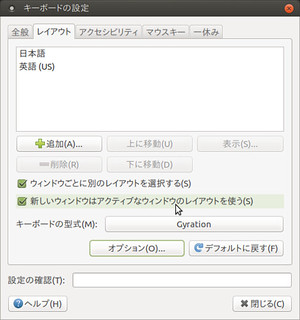
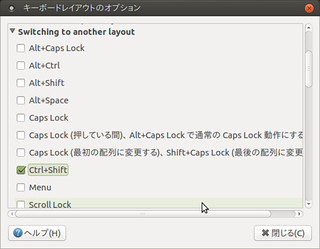
ということで最近の環境だとこの機能で切り替えるのが良さそうです.
—-