端末をWebブラウザで共有できるソフトウェエアです. 以前似たものでGoTTYを試してみましたが,ttydはGoTTYインスパイアらしいです. ttydはc製でMITライセンスです.
導入
今回はDebian stretch amd64(testing)に導入しました. README.mdではUbuntu 16.04での手順が書かれていますがそのまま使えました.
$ sudo apt install cmake g++ pkg-config git vim-common libwebsockets-dev libjson-c-dev libssl-dev
$ git clone https://github.com/tsl0922/ttyd.git
$ cd ttyd
$ mkdir build
$ cd build
$ cmake ..
$ make
動かしてみる
$ ./ttyd -p 8080 bashとしてウェブブラウザで http://localhost:8080/ に繋ぐと利用できます. tmuxのセッションを共有して複数のブラウザで1つの端末の操作とかdocker利用とかGoTTYと同じように利用できます.
$ ./ttyd -p 8080 tmux new -A -s ttyd
[2016/12/09 18:54:25:5954] NOTICE: Initial logging level 7
[2016/12/09 18:54:25:5954] NOTICE: Libwebsockets version: 2.0.3 unknown-build-hash
[2016/12/09 18:54:25:5954] NOTICE: IPV6 not compiled in
[2016/12/09 18:54:25:5954] NOTICE: libev support compiled in but disabled
[2016/12/09 18:54:25:5954] NOTICE: libuv support compiled in but disabled
[2016/12/09 18:54:25:5955] NOTICE:  Threads: 1 each 1024 fds
[2016/12/09 18:54:25:5955] NOTICE:  mem: platform fd map:  8192 bytes
[2016/12/09 18:54:25:5955] NOTICE:  Compiled with OpenSSL support
[2016/12/09 18:54:25:5955] NOTICE:  SSL disabled: no LWS_SERVER_OPTION_DO_SSL_GLOBAL_INIT
[2016/12/09 18:54:25:5955] NOTICE: Creating Vhost 'default' port 8080, 2 protocols
[2016/12/09 18:54:25:5955] NOTICE:  Listening on port 8080
[2016/12/09 18:54:25:5955] NOTICE:  mem: per-conn:          920 bytes + protocol rx buf
[2016/12/09 18:54:25:5956] NOTICE:  canonical_hostname = x220
[2016/12/09 18:54:25:5956] NOTICE: TTY configuration:
[2016/12/09 18:54:25:5956] NOTICE:   start command: tmux new -A -s ttyd
[2016/12/09 18:54:25:5956] NOTICE:   reconnect timeout: 10s
[2016/12/09 18:54:25:5956] NOTICE:   close signal: SIGHUP (1)
[2016/12/09 18:54:25:6057] NOTICE: lws_protocol_init
[2016/12/09 18:54:25:9806] NOTICE: HTTP connect from localhost (127.0.0.1), path: /
[2016/12/09 18:54:25:0015] NOTICE: HTTP connect from localhost (127.0.0.1), path: /auth_token.js
[2016/12/09 18:54:26:3474] NOTICE: client connected from localhost (127.0.0.1), total: 1
[2016/12/09 18:54:26:3548] NOTICE: started process, pid: 30365
[2016/12/09 18:54:34:2928] NOTICE: HTTP connect from localhost (127.0.0.1), path: /
[2016/12/09 18:54:34:3132] NOTICE: error on reading from skt : 104
[2016/12/09 18:54:34:3132] NOTICE: sending SIGHUP to process 30365
[2016/12/09 18:54:34:3138] NOTICE: process exited with code 256, pid: 30365
[2016/12/09 18:54:34:3138] NOTICE: client disconnected from localhost (127.0.0.1), total: 0
[2016/12/09 18:54:34:5554] NOTICE: HTTP connect from localhost (127.0.0.1), path: /auth_token.js
[2016/12/09 18:54:34:5732] NOTICE: client connected from localhost (127.0.0.1), total: 1
[2016/12/09 18:54:34:5811] NOTICE: started process, pid: 30505
[2016/12/09 18:54:40:0073] NOTICE: wsi 0x556bcbc34500: TIMEDOUT WAITING on 3 (did hdr 0, ah 0x556bcbbc0c50, wl 0, pfd events 0)
[2016/12/09 18:54:40:0074] NOTICE: lws_header_table_detach: wsi 0x556bcbc34500: ah held 6s, ah.rxpos 0, ah.rxlen 0, mode/state 0 4,wsi->more_rx_waiting 0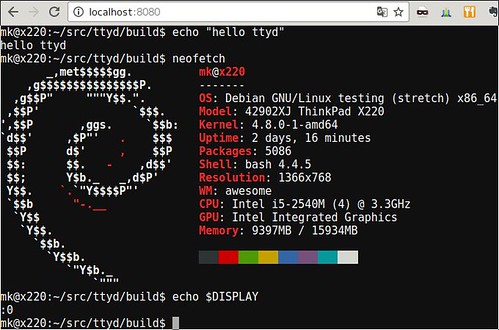
GoTTYについてはこちらを.
勉強会向けサーバを作ってみる2 / Rasbian jessieを試す/ Google Authenticatorのパスコードを作る from Kenichiro MATOHARA
One thought to “端末をWeb共有できるttyd”