Google Chrome からエクスポートしたパスワードリストを KeepassXC にインポート

人に説明するのに手元で試したのですがせっかくなのでblogに

Google Chrome のパスワードマネージャは使っているけれど,汎用的なKeepassXC に移行なメモです.

Google Chrome からパスワードのエクスポート

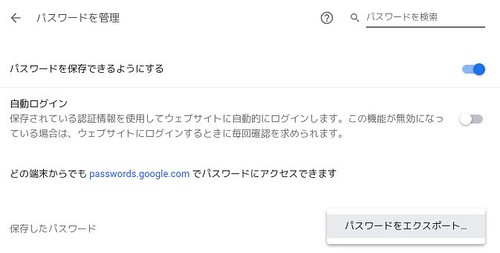
「設定」→「パスワードとフォーム」→「パスワードを管理」
若しくは chrome://settings/passwords にアクセス.

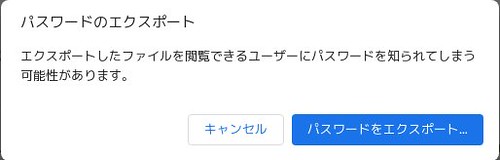
「︙」を押して「パスワードをエクスポート」から「パスワードをエクスポート…」から適当な場所にパスワードを保存します.

KeepassXC へのインポート

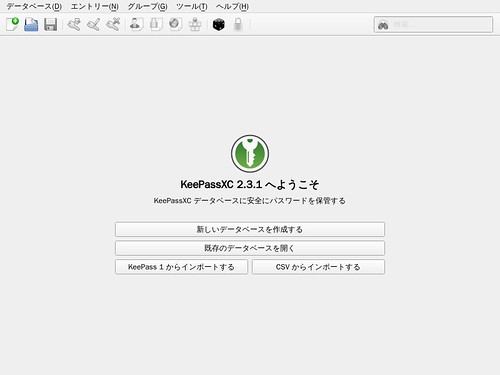
KeepassXC を起動して,「CSVからインポート」を選びます.

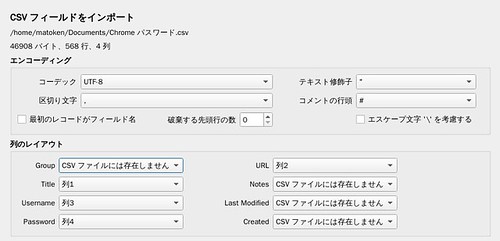
列のレイアウトを以下のようにしてインポートします.

  • Title : 列1

  • Username : 列3

  • Password : 列4

  • URL : 列2

ウェブブラウザへの拡張機能の導入

利用するウェブブラウザに拡張機能を導入する.

KeepassXC の「ツール」→「設定」の「ブラウザー統合」で利用するウェブブラウザを有効にする.
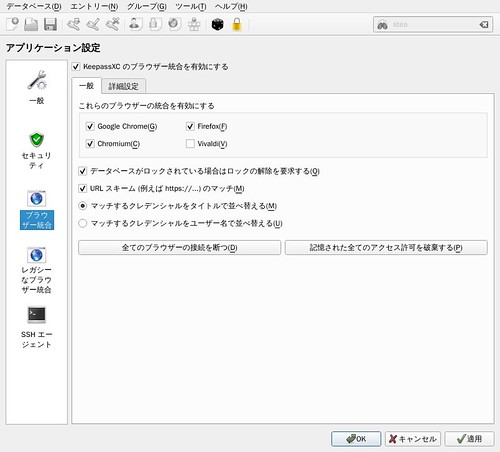
後はよしなに.

環境
$ dpkg-query -W keepassxc google-chrome-stable
google-chrome-stable    68.0.3440.106-1
keepassxc       2.3.1+dfsg.1-1
$ lsb_release -d
Description:    Debian GNU/Linux unstable (sid)
$ uname -m
x86_64

コメントを残す

メールアドレスが公開されることはありません。 が付いている欄は必須項目です

To respond on your own website, enter the URL of your response which should contain a link to this post's permalink URL. Your response will then appear (possibly after moderation) on this page. Want to update or remove your response? Update or delete your post and re-enter your post's URL again. (Find out more about Webmentions.)