ファミリーレストランのJoyfullに2017年から無料Wi-Fiが利用できるようになっていました.
これまではWi-Fiはopenで,接続後にWeb認証が必要でちょっと面倒でした.
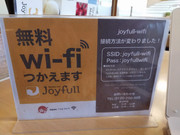
2019年01月01日にジョイフル鹿児島高山店で食事を摂ったときに接続方法が変更になっているのに気づきました.
一般的な事前共有鍵方式になっていました.
$ /sbin/iwlist wlan0 scanning | grep -A17 joyfull-wifi
                    ESSID:"joyfull-wifi"
                    Protocol:IEEE 802.11bgn
                    Mode:Master
                    Frequency:2.452 GHz (Channel 9)
                    Encryption key:on
                    Bit Rates:144 Mb/s
                    Extra:wpa_ie=dd1a0050f20101000050f20202000050f2020050f20401000050f202
                    IE: WPA Version 1
                        Group Cipher : TKIP
                        Pairwise Ciphers (2) : TKIP CCMP
                        Authentication Suites (1) : PSK
                    Extra:
                    IE: IEEE 802.11i/WPA2 Version 1
                        Group Cipher : TKIP
                        Pairwise Ciphers (2) : TKIP CCMP
                        Authentication Suites (1) : PSK
                    Quality=100/100  Signal level=-41 dBm
                    Extra:fm=0003
回線は変わらずAsahi Netのようです.
$ speedtest
Retrieving speedtest.net configuration...
Testing from Asahi Net (203.189.61.188)...
Retrieving speedtest.net server list...
Selecting best server based on ping...
Hosted by extride inc (Hitoyoshi) [74.79 km]: 47.434 ms
Testing download speed................................................................................
Download: 4.90 Mbit/s
Testing upload speed......................................................................................................
Upload: 23.25 Mbit/s
これまではユーザ登録が必要で1アカウントで同時接続は1端末までだったのでスマホとPCのように複数台使おうとすると困ったり.そもそもユーザ登録に失敗したりとちょっと面倒だったので助かります :)