Galeneというビデオカンファレンスサーバーがあります.WebRTCのSFUを利用し,低スペックなサーバーでも動作するのでセルフホストして利用しています.
Galeneのテキストチャットの保存をするのにチャット欄をコピー&ペーストしていますが面倒ですしコピーし忘れてしまうことも.
最近GaleneのGo製client libraryがリリースされたのでこれでチャットを保存できないか試してみました.
まずはsourceを貰ってきます.
$ git clone https://github.com/jech/gclient
$ cd gclient
example以下を見るとchat.goというものがあります.このまま使えそうです.
$ go build examples/chat/chat.go
$ ./chat
Usage: ./chat group
  -debug
        enable protocol logging
  -insecure
        don't check server certificates
  -password password
        password to use for login
  -username username
        username to use for login (default "chat-example")
Galeneのgroup urlを指定して実行することでテキストチャットの送受信ができました.このときのユーザ名は`chat-example`になります.
$ ./chat https://www.kagolug.org:8443/group/test/ (1)
user: hello world! (2)
user: 日本語
user: 絵文字🎨
hello (3)
chat-example: hello
^C
$ ./chat https://www.kagolug.org:8443/group/test/ (4)
user: hello world!
user: 日本語
user: 絵文字🎨
chat-example: hello
Galeneのgroup urlを指定して実行.
Galeneのテキストチャットがリアルタイムに表示される.
terminalからchatを送信.
接続し直すと過去の(期限切れになっていない)chat logも取得できる.
いい感じそうです.でもタイムスタンプも欲しいです.
ということで少し書き換えます.
$ git diff examples/chat/chat.go
diff --git a/examples/chat/chat.go b/examples/chat/chat.go
index 8c9211b..d2a637e 100644
--- a/examples/chat/chat.go
+++ b/examples/chat/chat.go
@@ -107,11 +107,11 @@ outer:
                                        fmt.Printf("* %v %v\n",
                                                e.Username, e.Value,
                                        )
-                               } else if e.Username == "" {
-                                       fmt.Printf("%v\n", e.Value)
+//                             } else if e.Username == "" {
+//                                     fmt.Printf("%v\n", e.Value)
                                } else {
-                                       fmt.Printf("%v: %v\n",
-                                               e.Username, e.Value,
+                                       fmt.Printf("%v %v: %v\n",
+                                               e.Time, e.Username, e.Value,
                                        )
                                }
                        case error:
$ go run examples/chat/chat.go https://www.kagolug.org:8443/group/test/
2025-06-03T05:16:04+09:00 user: hello world!
2025-06-03T05:18:12+09:00 user: 日本語
2025-06-03T05:18:33+09:00 user: 絵文字🎨
2025-06-03T05:18:45+09:00 chat-example: hello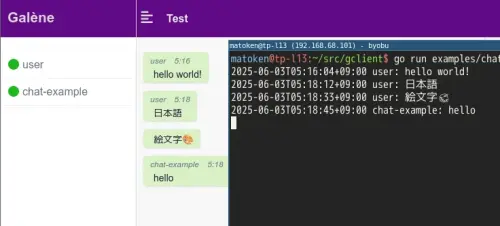
いい感じそうです.今度のミーティングに使ってみようと思います.
環境
$ git config remote.origin.url
https://github.com/jech/gclient
$ git log --pretty=oneline -1
e8edc33fd3d81701c5bad61e9bdb9399cd4e5dc4 (HEAD -> master, origin/master, origin/HEAD) Initial import.
$ dpkg-query -W golang
golang:amd64    2:1.24~2
$ go version
go version go1.24.2 linux/amd64
$ lsb_release -dr
Description:    Debian GNU/Linux 13 (trixie)
Release:        13
$ arch
x86_64