
さくらのナレッジに軽量ActivityPub Server のsnac についての記事を寄稿しました.
ここに書かなかったsnac のことをいくつか書いていこうと思います.
今日はsnac の通知について.
snac の通知は以下のように「notifications」の横に数字で通知されます.「notifications」リンクをクリックすることで詳細が表示されます.

しかしこの通知はsnac のページが読み込まれたタイミングにならないと通知がわかりません.
しかし代替の通知がいくつか実装されています.これらを利用することでほぼリアルタイムな通知が可能となります.
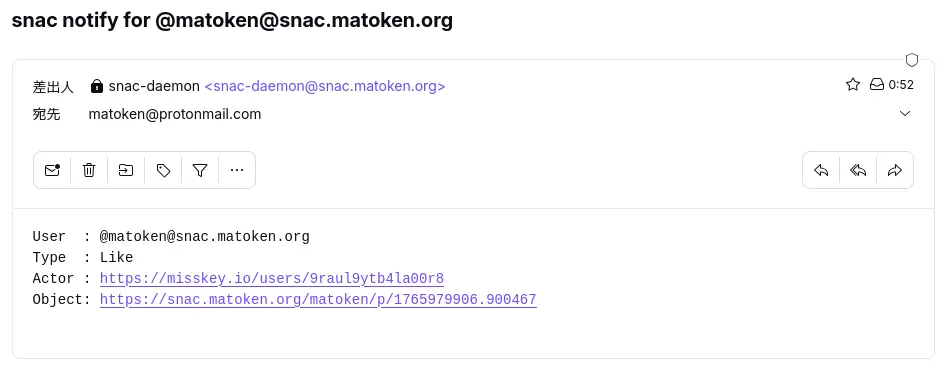
一般的なe-mail です.サーバーのメールシステムが設定済であればユーザーの「User Settings…」から「Email address for notifications:」に宛先のe-main address を入力するることで利用可能です.
サーバーのメールシステムの設定がされていなかったり,外部のメールシステムを利用したい場合 server.json の以下の項目を設定することでもメールが送信できます.
Email address for notifications
        If this field is not empty, an email message will be sent to this address whenever a post written by you is liked, boosted or replied to.
smtp_url Since version 2.76, email notifications can be sent via direct connection to an SMTP server instead of the traditional behaviour of piping the mes‐ sage to /usr/sbin/sendmail. Set this value to the SMTP url to be used for sending email notifications (for example, smtp://localhost). It may in‐ clude a port number if it's not running on the usual one, like in smtp://mail.example.com:587.smtp_usersmtp_password To be filled if the SMTP server defined by the previous directive needs credentials.
Telegram で通知
インスタントメッセージアプリケーションのTelegram にも対応しています.ただ,Telegram bot を作成して利用する必要があるので期設定が少し初面倒です.
Telegram notifications
        To  enable  notifications  via Telegram, fill the two provided fields (Bot API key and Chat id). You need to create both a Telegram channel and a
        bot for this; the process is rather cumbersome but it's documented everywhere. The Bot API key is a long string of  alphanumeric  characters  and
        the chat id is a big, negative number.
以前Telegram bot をNextcloud のTOTP の通知設定に利用するために書いたエントリがあります.
Telegram bot が作成できたら各ユーザの「User Settings…」の「Telegram notifications (bot key and chat id):」に設定することで利用できます.
ntfy で通知
OSS でセルフホスト可能でウェブブラウザやスマートフォンに通知ができるntfy というサービスがあります.これを利用してsnac の通知を行うことも可能です.
ntfy notifications
        To  enable  notifications  via  ntfy  (both self-hosted or standard ntfy.sh server), fill the two provided fields (ntfy server/topic and, if pro‐
        tected, the token).  You need to refer to the https://ntfy.sh web site for more information on this process.
セルフホスト可能ですが,とりあえずntfy.sh を利用して試すと良さそうです.
「User Settings…」の「ntfy notifications (ntfy server and token):」に設定することで通知できるようになります.
Webhook で通知
色々なサービスが対応しているWebhook も利用可能です.
Notify webhook
        If this is set to an URL, an HTTP POST will be sent to it whenever a new notification happens (see the 'Webhook for notifications' section  below
        for more information).
例えばDiscord であれば,「チャンネルの編集」→「連携サービス」→「ウェブフックを作成」で生成されるURL を利用して通知できます.
これを「User Settings…」の「Notify webhook:」に入力することで通知可能です.
mastodon アプリケーションでの通知
snac はmastodon API に対応しています.そのためmastodon アプリケーションが利用可能です.
mastodon アプリケーションの通知機能を使って通知を受けることが可能です.