
さくらのナレッジに軽量ActivityPub Server のsnac についての記事を寄稿しました.
ここに書かなかったsnac のことをいくつか書いていこうと思います.
今日はsnac のbot 向け投稿機能について.
bot やアナウンスなど向けのアカウントで自動投稿をしたいことがあります.
例えばいま考えているのはCalDav から今日のイベントを投稿するアカウント.現在はWebhook 経由でDiscord にpost したりしています.
snac でもいくつか自動投稿する機能があります.
Implementing post bots
snac makes very easy to post messages in a non-interactive manner. This example posts a string:
uptime | snac note $SNAC_BASEDIR $SNAC_USER –
You can setup a line like this from a crontab(5) or similar. Take note that you need a) command-line access to the same machine that hosts the snac instance, and b) write permissions to the storage directories and files.
You can also post non-interactively using the Mastodon API and a command-line http tool like curl(1) or similar. This has the advantage that you can do it remotely from any host, anywhere; the only thing you need is an API Token. This is an example:
curl -X POST https://$SNAC_HOST/api/v1/statuses \
–header “Authorization: Bearer ${TOKEN}” -d “status=$(uptime)”You can obtain an API Token by connecting to the following URL:
note basedir uid text [file file ... [-r inReplyTo [-d YYYYmmddHHMMSS]]]
        Enqueues a Create + Note message to all followers. If the text argument is -e, the external editor defined by  the  EDITOR  environment  variable
        will  be invoked to prepare a message; if it's - (a lonely hyphen), the post content will be read from stdin.  The rest of command line arguments
        are treated as media files to be attached to the post. The LANG environment variable (if defined) is used as the post language. An  optional  URL
        to  a  Fediverse post, prefixed by -r, can be specified for this note to be a reply to. If a date in YYYYmmddHHMMSS format is followed by -d, the
        note is scheduled for that moment instead of immediately posted (this date must be in the same timezone the user has configured in the web UI).
note_unlisted basedir uid text [file file ... [-r inReplyTo [-d YYYYmmddHHMMSS]]] Like the previous one, but creates an "unlisted" (or "quiet public") post.note_mention basedir uid text [file file ... [-r inReplyTo [-d YYYYmmddHHMMSS]]] Like the previous one, but creates a post only for accounts mentioned in the post body.block basedir instance_url
snac note コマンドでの投稿
snac の動作している環境で実行できるのであればお手軽なsnac のnote コマンドがあります.
man(1) にある例を真似してみます.
uptime | snac note $SNAC_BASEDIR $SNAC_USER –
$ uptime | pee "./snac note snac-test test -" cat
 23:32:36 up 4 days, 10:17,  1 user,  load average: 1.56, 1.90, 1.69
23:32:36 [test] enqueue_message http://127.0.0.1:8001/test/p/1766154756.511450/Create
8       /�
投稿を確認するとこんな感じ.

日本語もそのままでok でした.

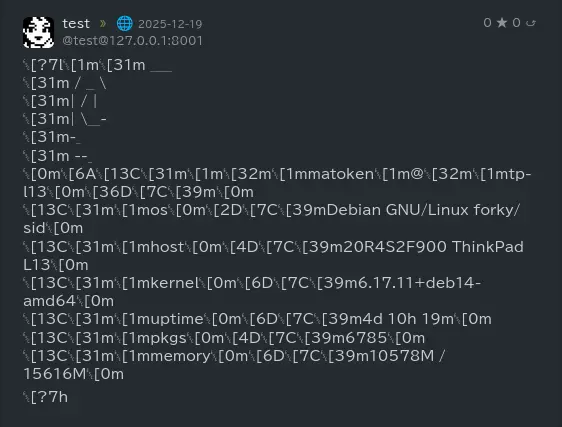
pfetch を流し込んでみるとこんな感じで整形を考えないとダメそう.
curl を使ってAPI 経由で投稿
こちらは一般的なネットワーク経由でリモートで投稿可能な方法です.token を入手してcurl コマンドで投稿します.
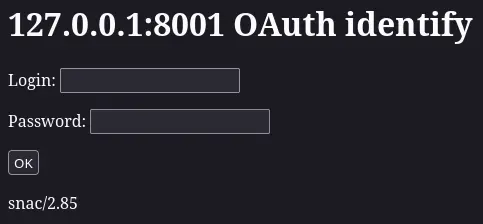
まず以下のようなURL でtoken を取得します.
以下のような画面になるので対象アカウントの情報を入手します.
以下のようなトークンが取得できるのでメモします.
1f3ea50e9ab7cc85f5ff01b8f43fb1ae
後はcurl などで以下のようにPOST.
json で返り値が帰ってきます.
$ curl -X POST http://127.0.0.1:8001/api/v1/statuses --header "Authorization: Bearer 1f3ea50e9ab7cc85f5ff01b8f43fb1ae" -d "status=$(uptime)"
{
    "id": "1766155742b0f5ed692a273ff5b6ef59b696ddde76",
    "uri": "http://127.0.0.1:8001/test/p/1766155742.788170",
    "url": "http://127.0.0.1:8001/test/p/1766155742.788170",
    "account": {
        "id": "488d5ffe15e31aa0be5002853e8006f7",
        "username": "test",
        "display_name": "test",
        "discoverable": true,
        "group": false,
        "hide_collections": false,
        "indexable": true,
        "noindex": false,
        "roles": [
        ],
        "acct": "test@127.0.0.1:8001",
        "created_at": "2025-11-14T19:38:38Z",
        "last_status_at": "2025-12-19",
        "bot": false,
        "note": "<br>",
        "url": "http://127.0.0.1:8001/test",
        "uri": "http://127.0.0.1:8001/test",
        "avatar": "http://127.0.0.1:8001/susie.png",
        "avatar_static": "http://127.0.0.1:8001/susie.png",
        "header": "",
        "header_static": "",
        "emojis": [
        ],
        "locked": false,
        "followers_count": 0,
        "following_count": 0,
        "statuses_count": 0,
        "fields": [
        ]
    },
    "created_at": "2025-12-19T14:49:02.000Z",
    "content": "23:49:02 up 4 days, 10:34,  1 user,  load average: 1.48, 1.57, 1.68<br>",
    "visibility": "public",
    "sensitive": false,
    "spoiler_text": "",
    "media_attachments": [
    ],
    "mentions": [
    ],
    "tags": [
    ],
    "emojis": [
    ],
    "favourites_count": 0,
    "favourited": false,
    "reblogs_count": 0,
    "reblogged": false,
    "replies_count": 0,
    "in_reply_to_id": null,
    "in_reply_to_account_id": null,
    "reblog": null,
    "card": null,
    "language": "en",
    "filtered": [
    ],
    "muted": false,
    "text": " 23:49:02 up 4 days, 10:34,  1 user,  load average: 1.48, 1.57, 1.68",
    "edited_at": null,
    "poll": null,
    "bookmarked": false,
    "pinned": false
}
Reposts