flyover は引数で指定した場所(地名や座標で指定可能)の(主に)航空機の情報をflightradar24 から取得して表示してくれるbash script です.
まずは依存関係のパッケージを導入します.
## Dependencies
–curl jq
–notify-send: (optional)In a Debian-like distro, these can be installed with:
sudo apt install curl jq libnotify-bin
— README.mdより
$ sudo apt install curl jq libnotify-bin
Note |
デスクトップ通知を利用しない場合は libnotify-bin は不要 |
bash script なのでscript を貰ってきてbash に渡せば動きます.
$ wget https://github.com/pvonmoradi/flyover-bash/raw/refs/heads/master/flyover
$ bash ./flyover -h
DESCRIPTION
    A simple client for flightradar24.com. Shows info of aircrafts flying
    overhead in a [latitude ± δ, longitude ± δ] vicinity

USAGE: flyover [OPTIONS]
OPTIONS
      [-s search_str]
        Search for city/region/place
        Use quotes for multi-word queries
      [-y latitude]
        Negative for south of equator and positive for north of equator
        Range: -90 <= latitude[float] <= +90
      [-x longitude]
        Negative for west of Prime Meridian and positive for east of Prime Meridian
        Range: -180 <= longitude[float] <= +180
      [-b bounds]
        Geographic bounds of the region of interest
        Format (comma-separated): "lat1,lon1,lat2,lon2"
      [-i flight_ids]
        flightradar24 flight_ids as a comma-separated list
        In this mode, only the corresponding flight details are queried
        Note: id is flightradar24's internal id (not ICAO or other standards)
        Format example: "id1,id2,id3"
      [-r delta_deg]
        δ in degrees in scan square : [latitude ± δ, longitude ± δ]
        Note: 1° of latitude ≈ 111 km
        Range: r[float] > 0
      [-o /path/to/detailed_flights]
        Set output path for detailed info of flights (json array)
        (implies 'detailed' mode)
      [-n]
        Use notification (implies 'detailed' mode)
      [-f]
        Set mode to 'brief', only print an augmented json
      [-v log_level]
        v = 0 : No logs. Equivalent to -q
        v = 1 : Set level to error
        v = 2 : Set level to warn
        v = 3 : Set level to info (default)
        v = 4 : Set level to debug
      [-q]
        Set log level to v = 0
      [-V]
        Print version
      [-h]
        Print help message

NOTES
    - latitude/longitude should be input in decimal degrees (not DMS)
    - Either use -s (geolocation service) OR (-y,-x) but NOT both
    - Default mode of operation is 'detailed'

EXAMPLES
    flyover -s "deylaman" -r 2
    flyover -s "قلعه گبری" -r 0.5 -n -v4
    flyover -y "-27.115" -x "-109.395" -r 24.15 -o /tmp/detailed.json
    flyover -s "深圳" -qf
    flyover -i "2b1abd2f,2b1cae23"
    flyover -b "43.58,58.72,46.58,61.72"
とりあえずhelp の下部に書かれているEXAMPLES を真似してみます.
$ bash ./flyover -s "tokyo" -r 2
[info ] Match found: "東京都, 日本"
[info ] 'tokyo' WGS84 coordinates at latitude=35.6768601, longitude=139.7638947
./flyover: line 264: bc: command not found
[error] Problem in generating bounds. Check -h
が,失敗しました. bc コマンドが足りないようです.
bc コマンドのパッケージを探して導入したら動くようになりました.
$ apt-file search -x bin/bc$
9base: /usr/lib/plan9/bin/bc
bc: /usr/bin/bc
$ sudo apt install bc
$ bash ./flyover -s "tokyo" -r 2
[info ] Match found: "東京都, 日本"
[info ] 'tokyo' WGS84 coordinates at latitude=35.6768601, longitude=139.7638947
[info ] Scan region for δ=2°: 37.676860,33.676860,137.763895,141.763895
———————
Air Canada, AC1/ACA1
✈️ Boeing 777-333(ER)
↗️ Canada, Toronto
↘️ Japan, Tokyo
📅 Landed 20:29
📏 0km, 9km/h
https://www.flightradar24.com/ACA1/3d9afc99
———————
China Airlines, CI35/CAL035
✈️ Airbus A350-941
↗️ United States, Phoenix
↘️ Taiwan, Taipei
📅 Delayed 22:47
📏 12km, 664km/h
https://www.flightradar24.com/CAL035/3d9b45e8
———————
Qantas, QF59/QFA59
✈️ Airbus A330-303
↗️ Australia, Sydney
↘️ Japan, Tokyo
📅 Delayed 20:41
📏 1km, 494km/h
https://www.flightradar24.com/QFA59/3d9b996e
^C
README.md を修正したほうが良さそう.
$ git diff
diff --git a/README.md b/README.md
index cf34873..1847e02 100644
--- a/README.md
+++ b/README.md
@@ -16,13 +16,13 @@ latitude/longitude and δ.


 ## Dependencies
-- `curl jq`
+- `curl jq bc`
 - `notify-send`: (optional)

 In a Debian-like distro, these can be installed with:

 ``` shell
-sudo apt install curl jq libnotify-bin
+sudo apt install curl jq bc libnotify-bin
 ```

 ## Usage
-n のデスクトップ通知も試してみるとこんな感じで出てきます.
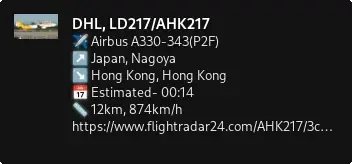
常駐して指定範囲内に航空機が現れたらnotify が出せたりすると便利そうですがそういう機能は無さそうです.
自分の家のあたりは上空をたくさんの飛行機が通り,夜間帯などは航空機が通る音がよく聞こえます.そういうときにこのコマンドを叩くと何が飛んでいるかわかって楽しそうです.(自衛隊機もよく通りますがこれらはfr24に載らないのであまり面白くない……)
環境
$ dpkg-query -W bash curl jq bc libnotify-bin
bash    5.2.15-2+b9
bc      1.07.1-3
curl    7.88.1-10+rpi1+deb12u14
jq      1.6-2.1+deb12u1
libnotify-bin   0.8.1-1
$ lsb_release -dr
No LSB modules are available.
Description:    Raspbian GNU/Linux 12 (bookworm)
Release:        12
$ arch
armv7l
Reposts