久々にcli でVirusTotal を使おうとしたらツールが変更になっていたり,API 制限がおかしくなっていました.
以前のblog エントリを確認すると,
以下のツールを使っていたようですが,Archived になっています.
現在は以下のツールがアクティブなようなのでこちらを使うことにしました.
$ git clone https://github.com/VirusTotal/vt-cli
$ cd vt-cli
$ make
$ build/vt -h
A command-line tool for interacting with VirusTotal.

Usage:
  vt [command]

Available Commands:
  analysis       Get a file or URL analysis
  collection     Get information about collections
  completion     Output shell completion code for the specified shell (bash or zsh)
  domain         Get information about Internet domains
  download       Download files
  file           Get information about files
  group          Get information about VirusTotal groups
  help           Help about any command
  hunting        Manage malware hunting rules and notifications
  init           Initialize or re-initialize vt command-line tool
  iocstream      Manage IoC Stream notifications
  ip             Get information about IP addresses
  meta           Returns metadata about VirusTotal
  monitor        Manage your monitor account
  monitorpartner Manage your monitor partner account
  retrohunt      Manage retrohunt jobs
  scan           Scan files or URLs
  search         Search for files in VirusTotal Intelligence
  threatprofile  Get information about Threat Profiles
  url            Get information about URLs
  user           Get information about VirusTotal users
  version        Show version number

Flags:
  -k, --apikey string   API key
      --format string   Output format (yaml/json/csv) (default "yaml")
  -h, --help            help for vt
  -s, --silent          Silent or quiet mode. Do not show progress meter
  -v, --verbose         verbose output

Use "vt [command] --help" for more information about a command.$ build/vt init ██╗ ██╗██╗██████╗ ██╗ ██╗███████╗████████╗ ██████╗ ████████╗ █████╗ ██╗ ██║ ██║██║██╔══██╗██║ ██║██╔════╝╚══██╔══╝██╔═══██╗╚══██╔══╝██╔══██╗██║ ██║ ██║██║██████╔╝██║ ██║███████╗ ██║ ██║ ██║ ██║ ███████║██║ ╚██╗ ██╔╝██║██╔══██╗██║ ██║╚════██║ ██║ ██║ ██║ ██║ ██╔══██║██║ ╚████╔╝ ██║██║ ██║╚██████╔╝███████║ ██║ ╚██████╔╝ ██║ ██║ ██║███████╗ ╚═══╝ ╚═╝╚═╝ ╚═╝ ╚═════╝ ╚══════╝ ╚═╝ ╚═════╝ ╚═╝ ╚═╝ ╚═╝╚══════╝ VirusTotal Command-Line Interface: Threat Intelligence at your fingertips. Enter your API key: xxxxxxxxxxxxxxxxxxxxxxxxxxxxxxxxxxxxxxxxxxxxxxxxxxxxxxxxxxxxxxxx API key written to config file: /home/matoken/.vt.toml Relationships cache written to: /home/matoken/.cache/.vt.relationships.cache
Note | API key はVirusTotal のアカウントを作成してログインした状態で,右上のユーザーをクリックしたときに出てくる「API key」から取得できます. |
準備ができたのでスキャンしたいファイルをアップロードします.
$ build/vt scan file ~/Downloads/briar-desktop-x64-0.6.4-beta.AppImage
/home/matoken/Downloads/briar-desktop-x64-0.6.4-beta.AppImage YTg3MzBiNGEwOWFmODUxMjgwYmFjOGI0YjE1YmQ4MTE6MTc3MDE5NDcyOA==
結果を確認してみようとします.しかし制限に掛かってしまっています.
$ build/vt analysis YTg3MzBiNGEwOWFmODUxMjgwYmFjOGI0YjE1YmQ4MTE6MTc3MDE5NDcyOA==
Quota exceeded
無料アカウントの制限を確認すると1日あたり500リクエストとか1分辺り4件とかで結構広くなぜ制限されたのかわかりません.
Public API constraints and restrictions
The Public API is limited to 500 requests per day and a rate of 4 requests per minute.
The Public API must not be used in commercial products or services.
The Public API must not be used in business workflows that do not contribute new files.
You are not allowed to register multiple accounts to overcome the aforementioned limitations.
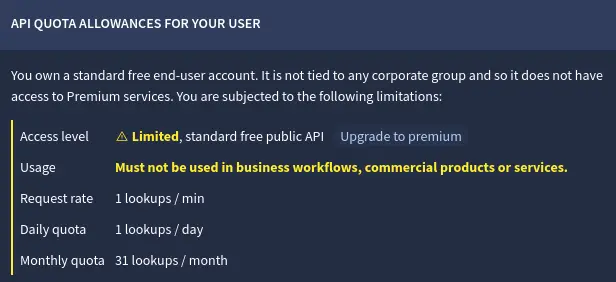
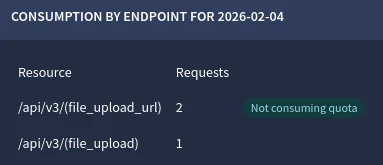
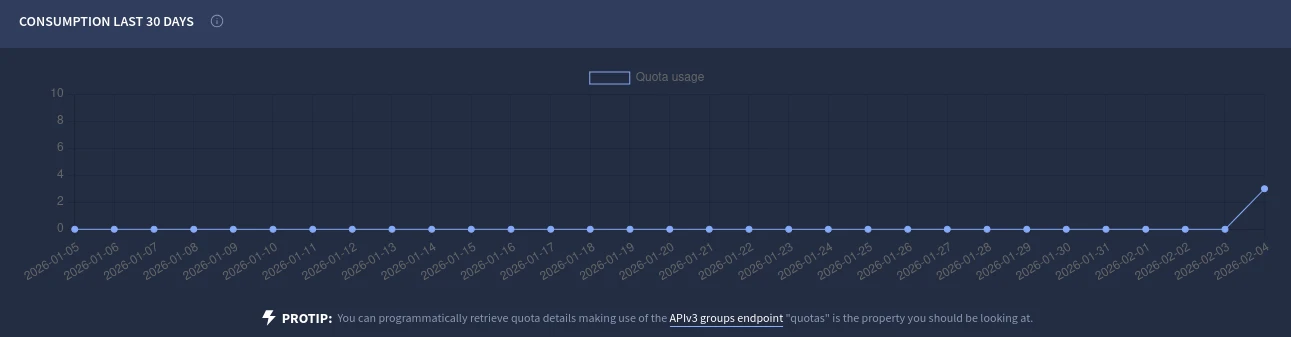
自分のAPI ページを確認するとリファレンスページと違い以下のように1日1問い合わせになっています.少なすぎる…….
Access level
 Limited , standard free public API
Upgrade to premium
Usage 	Must not be used in business workflows, commercial products or services.
Request rate 	1 lookups / min
Daily quota 	1 lookups / day
Monthly quota 	31 lookups / month
以下のフォーラムを見ると結構古い問題のようでアカウントを作り直さないと治らなそうです.
If you have an old account with stricter limitations than described, it might be best to set up a new account to ensure you benefit from current limitations stated.
ちなみにプロフィールページはこんな感じで9年前に作ったアカウントのようです.

仕方がないのでVirusTotal のアカウントを削除して作り直します.

既存アカウントを削除
既存アカウントからログアウト
新規アカウントを作成
このときアカウント名とメールアドレスが同じだと駄目
API key を取得して vt init を実行してAPI key 再登録
新しいアカウントは以下のように正い制限になりました.
Access level
 Limited , standard free public API
Upgrade to premium
Usage 	Must not be used in business workflows, commercial products or services.
Request rate 	4 lookups / min
Daily quota 	500 lookups / day
Monthly quota 	15.5 K lookups / month
これで普通に動かせそうな感じです.
$ build/vt analysis YTg3MzBiNGEwOWFmODUxMjgwYmFjOGI0YjE1YmQ4MTE6MTc3MDE5NDcyOA== | tail -10
  stats:
    confirmed-timeout: 0
    failure: 0
    harmless: 0
    malicious: 0
    suspicious: 0
    timeout: 0
    type-unsupported: 12
    undetected: 64
status: "completed"$ build/vt version vt-cli $ git log --pretty=oneline -1 d3405587c568b6486ccd5ac773cde1a25e4bb762 (HEAD -> master, origin/master, origin/HEAD) chore: upgrade `vt-go` to version 1.1.0. $ lsb_release -dr Description: Debian GNU/Linux forky/sid Release: n/a $ arch x86_64