ビデオカンファレンスソフトウェアのGaleneのMLにpw-whipというPipeWire-WHIP pridgeを作ったよというメールが流れてきました.
Pw-whip is a bridge between PipeWire and WHIP.
https://github.com/jech/pw-whipIt can be used to stream the audio of any Linux application to Galene:
pw-whip -C mpv https://galene.org:8443/group/public/pw-whip/.whipThis is currently audio-only, I’ll extend it to do video if there’s demand.
Galeneは結構前からWHIPに対応していて,OBS Studioなどから送信できていました.今回のpw-whipでLinuxのPipeWire(PulseAudioの光景によく使われている)からGaleneに音声メディアを転送できるようになります.
build
ここではDebian sid amd64環境でbuildしました.
基本的にREADME.mdのとおりですが何箇所か引っかかりました.
依存パッケージの導入
まずは依存パッケージの導入.
$ sudo apt install libopus-dev libpipewire-0.3-dev
libdtachannelのbuild
WebRTCのMedia Transportに使うlibdtachannelのbuildを行います.
~/src はpw-whipのMakefileにハードコードされているので ~/src 以下で作業したほうが手間がないです.
~/src以下にsourceを持ってきてCmakeで失敗.
$ cd ~/src
$ git clone https://github.com/paullouisageneau/libdatachannel
$ cd libdatachannel
$ cmake -Bbuild
CMake Error at CMakeLists.txt:328 (add_subdirectory):
  The source directory

    /home/matoken/src/libdatachannel/deps/plog

  does not contain a CMakeLists.txt file.

  :
  :
deps/plogの中は空です.そして同様のエラーが続きます.
libdatachannelのBUILDING.mdにはgit submoduleも引っ張ってくるように書かれています.
## Init submodules
This step is optional if
PREFER_SYSTEM_LIBCMake option will be enabled.$ cd libdatachannel $ git submodule update --init --recursive --depth 1
ということでsubmoduleを貰ってきて再度cmakeから.
今度はCmakeもmakeも通りました.
.so を/usr/local/lib/ 以下にコピーしてpw-whipのbuildに.
$ git submodule update --init --recursive --depth 1
$ cmake -Bbuild
$ cd build
$ make -j
$ sudo mv libdatachannel.so* /usr/local/lib/
$ sudo ldconfig
$ cd ..
$ git clone https://github.com/jech/pw-whip
$ cd pw-whip
$ make -j
Note | pw-whipのCommit c945067より前だとTypeがあったようで以下のようなエラーになります.最新にしてからmakeしましょう. In file included from whip.cpp:8:
whip.hpp: In constructor ‘WhipClient::WhipClient(std::string, bool)’:
whip.hpp:18:15: error: ‘class WhipClient’ has no member named ‘seqno’
18 | this->seqno = 42;
| ^~~~~
In file included from main.cpp:10:
whip.hpp: In constructor ‘WhipClient::WhipClient(std::string, bool)’:
whip.hpp:18:15: error: ‘class WhipClient’ has no member named ‘seqno’
18 | this->seqno = 42;
| ^~~~~ |
pw-whip
usage見てもよくわかんないな?
$ ./pw-whip
Usage: ./pw-whip [-k] [-t token] [-c] [-C target] [-b bitrate] [-d] endpoint
README.mdを参考にまずはこんな感じで
$ ./pw-whip -k -c https://localhost:9443/group/test/.whip
-k はオレオレ証明書なのでTLS証明書を確認しないように. -c でPipeWire既定値のsourceを転送します.
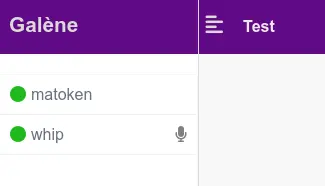
今回は内蔵マイクを規定値にしたら内蔵マイクの音が届きました.
$ ./pw-whip -k -C mpv https://localhost:9443/group/test/.whip
次はこんな感じで -C mpv を指定.これでmpvのソースを転送します.mpvで再生した動画の音声が転送されました.
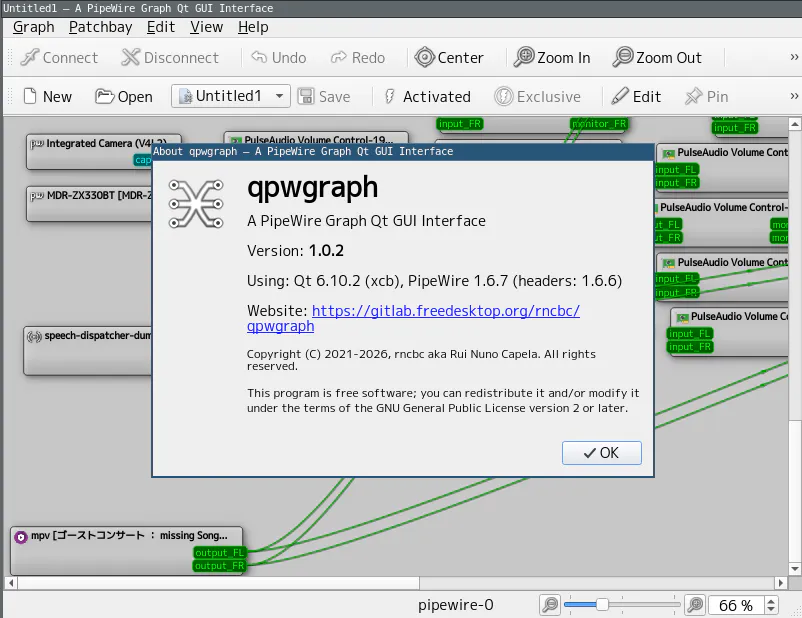
このときのPipeWireのソースはqpwgraphや, pw-cli ls Node コマンドなどで確認できます.
ということでPipwWireが動いていてリアルタイムにopusに変換できるくらいのスペックの端末(古めのRaspberryPiなど)からもGaleneに音声を送り込めそうです.
armでのbuildも試してみようと思います.
関連URL
環境
$ dpkg-query -W libopus-dev libpipewire-0.3-dev build-essential git
build-essential 12.12
git     1:2.53.0-1
libopus-dev:amd64       1.6.1-1+b1
libpipewire-0.3-dev:amd64       1.6.7-1
$ lsb_release -dr
Description:    Debian GNU/Linux forky/sid
Release:        n/a
$ arch
x86_64