Linux iBus/fcitx5にも対応した日本語入力システムのMeltype を試しはじめました。
MeltypeはLinux, Windows, macOSに対応している日本語入力システムです。半角/全角を自動判別してくれるようです。
Linuxではamd64/arm64アーキテクチャー、iBus/fcitx5に対応しているようです.
ライセンスはGPL-3.0 licenseです。
導入
今回はDebian sid amd64のfcitx5環境に導入しました。
GitHub Releases から現時点での最新の1.3.0のamd64の.deb を使いました。
$ wget -c https://github.com/yksr-melt/Meltype/releases/download/v1.3.0/meltype_1.3.0_amd64.deb
$ sha256sum meltype_1.3.0_amd64.deb
6eec30d93299399ec19f89c73cda0796ad6f08606cc106dec07a4166a3c64862  meltype_1.3.0_amd64.deb
$ vt file 6eec30d93299399ec19f89c73cda0796ad6f08606cc106dec07a4166a3c64862
File "6eec30d93299399ec19f89c73cda0796ad6f08606cc106dec07a4166a3c64862" not found
$ vt scan file ./meltype_1.3.0_amd64.deb --wait
$ vt file 6eec30d93299399ec19f89c73cda0796ad6f08606cc106dec07a4166a3c64862 --format json | jq '.[0].last_analysis_stats'
{
  "confirmed-timeout": 1,
  "failure": 0,
  "harmless": 0,
  "malicious": 0,
  "suspicious": 0,
  "timeout": 0,
  "type-unsupported": 14,
  "undetected": 60
}
$ sudo apt install ./meltype_1.3.0_amd64.deb
Note | https://www.virustotal.com/gui/file/6eec30d93299399ec19f89c73cda0796ad6f08606cc106dec07a4166a3c64862 |
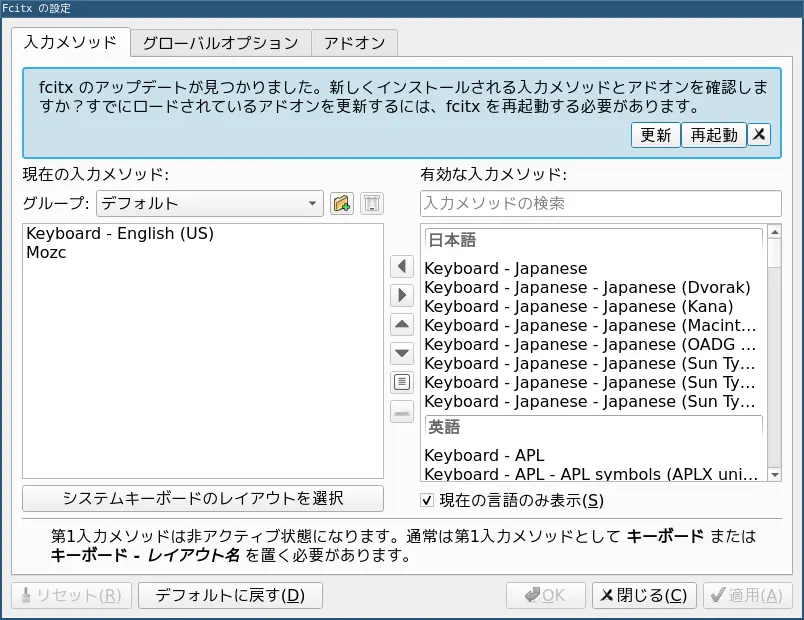
パッケージ導入後はfcitx5に登録します. fcitx5-config-qt を起動、
この時点ではfcitx5はMeltype を見つけてくれません。メッセージにあるように「更新」ボタンを押すことで認識しました。
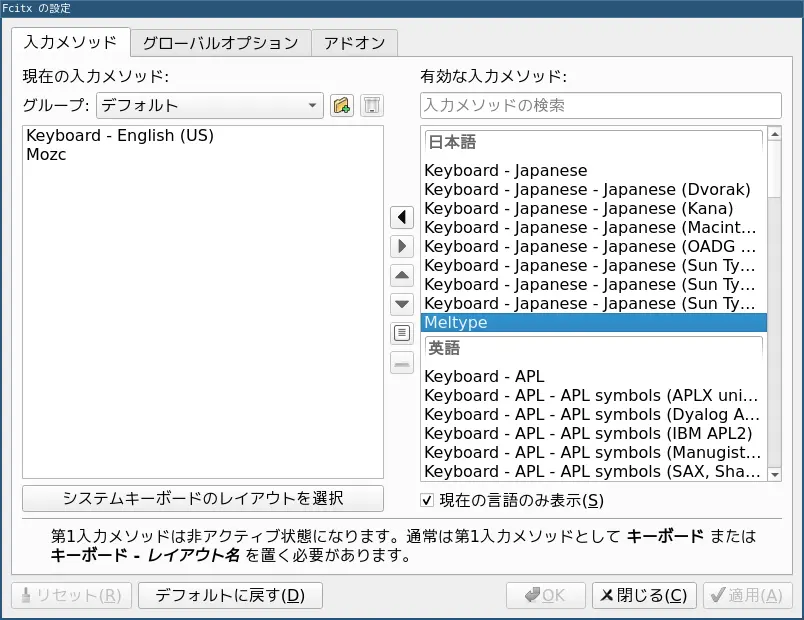
Meltype を追加して「適用」を押すと使えるようになります。
まだ導入したばかりで使い勝手はまだなんとも言えませんがしばらく試してみようと思います。
環境
$ dpkg-query -W fcitx5* meltype
fcitx5  5.1.23-1
fcitx5-chinese-addons
fcitx5-config-qt        5.1.16-1
fcitx5-configtool
fcitx5-configtool-data
fcitx5-data     5.1.23-1
fcitx5-frontend-all     5.1.23-1
fcitx5-frontend-fbterm
fcitx5-frontend-gtk2
fcitx5-frontend-gtk3    5.1.7-1
fcitx5-frontend-gtk4    5.1.7-1
fcitx5-frontend-qt5     5.1.16-1
fcitx5-frontend-qt6     5.1.16-1
fcitx5-frontend-tmux
fcitx5-module-dbus
fcitx5-module-emoji
fcitx5-module-fcitx4
fcitx5-module-ibus
fcitx5-module-kimpanel
fcitx5-module-quickphrase
fcitx5-module-wayland
fcitx5-module-xorg
fcitx5-modules:amd64    5.1.23-1
fcitx5-mozc:amd64       3.33.6133+ds1-0.2
meltype 1.3.0
$ lsb_release -dr
Description:    Debian GNU/Linux forky/sid
Release:        n/a
$ arch
x86_64
Reposts