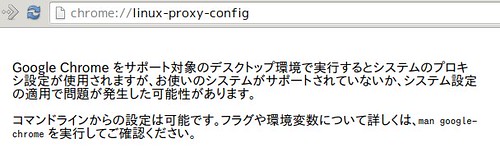
昨日久々に外出してssh -NでChromeにsocks proxyを設定して使おうとしたのですが以下のようなメッセージが表示されて設定できませんでした.
 🏛️
🏛️
恐らく統合デスクトップ環境ではないawesomeを使っているのでこの機能に対応していないんだろうなと.
manの該当部分はこんな感じでpacファイルなども利用できるよう.
--proxy-server=host:port
Specify the HTTP/SOCKS4/SOCKS5 proxy server to use for requests. This overrides any environment variables or settings picked via the options dialog.
An individual proxy server is specified using the format:
[<proxy-scheme>://]<proxy-host>[:<proxy-port>]
Where <proxy-scheme> is the protocol of the proxy server, and is one of:
"http", "socks", "socks4", "socks5".
If the <proxy-scheme> is omitted, it defaults to "http". Also note that "socks" is equivalent to "socks5".
Examples:
--proxy-server="foopy:99"
Use the HTTP proxy "foopy:99" to load all URLs.
--proxy-server="socks://foobar:1080"
Use the SOCKS v5 proxy "foobar:1080" to load all URLs.
--proxy-server="socks4://foobar:1080"
Use the SOCKS v4 proxy "foobar:1080" to load all URLs.
--proxy-server="socks5://foobar:66"
Use the SOCKS v5 proxy "foobar:66" to load all URLs.
It is also possible to specify a separate proxy server for different URL types, by prefixing the proxy server specifier with a URL specifier:
Example:
--proxy-server="https=proxy1:80;http=socks4://baz:1080"
Load https://* URLs using the HTTP proxy "proxy1:80". And load http://*
URLs using the SOCKS v4 proxy "baz:1080".
--no-proxy-server
Disables the proxy server. Overrides any environment variables or settings picked via the options dialog.
--proxy-auto-detect
Autodetect proxy configuration. Overrides any environment variables or settings picked via the options dialog.
--proxy-pac-url=URL
Specify proxy autoconfiguration URL. Overrides any environment variables or settings picked via the options dialog.
とりあえずは以下のようなオプションで起動することで回避できました.
$ google-chrome --proxy-server="socks://localhost:8080"
この状態で設定を見るとグレーアウトになって設定変更できません.
 🏛️
🏛️
ということでこの方法だと切り替えのたびにChromeの起動し直しが必要でタブを大量に開いている時など辛いです.proxy.pacを作りこんだらとも思ったのですがこの感じだと起動時にしか評価し無さそう.
ということでこのようなものを入れてみました.
設定を作っておいてワンタッチで切り替えできるようになりました.
そもそもシステムのプロキシの設定が見えない問題は未解決ですが…….
ちなみにproxyの確認には以下のsiteが便利です.欲しい情報だけ貰うことやxml/json形式でも情報を貰うことが出来ます.
昔は自分のsiteにこんな感じのscript仕込んでましたが最近は色々なサービスが合って便利ですね :)
echo -e 'Content-Type: text/plain\n\n'
echo `printenv`