小さく可愛いCLI 天気アプリケーションのstarlit を少し試してみました.
starlit はPython製,ライセンスは不明です.
pipx で導入しました.
$ pipx install starlit-cli
  installed package starlit-cli 0.2.3, installed using Python 3.13.9
  These apps are now globally available
    - starlit
done! ✨ 🌟 ✨
$ starlit --help

Starlit is a minimal, cute and customizable weather cli.
Weather forecasts, beautifully styled for your terminal!

USAGE


  starlit [city] [--flags]


EXAMPLES


   # Get weather for default city
   starlit

   # Get weather for a specific city
   starlit tokyo

   # Start interactive mode
   starlit --interactive


FLAGS

  -s --setup                Create configuration folder with .env file
  -e --edit                 Open configuration file in default editor
  -c --config               View configuration settings in terminal
  -i --interactive          Start interactive mode
  -v --version              Show starlit version
  -h --help                 Show this help message
--setup オプションで設定ファイルを設定します.設定ファイルは $HOME/.config/starlit/.env に作られます.
$ starlit --setup

 DONE  Config created at `/home/matoken/.config/starlit/.env`

Would you like to edit the config now? (y/n): y

 EDIT  Opened .env file in default editor
設定ファイルを編集して最低限 API_KEY (OpenWeatherMap API key) と DEFAULT_CITY (既定値の都市)を指定します.
OpenWeatherMap API key は以下から,
都市は以下のあたりで確認します.
実行します.実際はカラフルでアニメーションで表示されます.
$ starlit
Forecast for Kanoya, JP ☁️
weather › cloudy (16.1°C)
.--. sunset › 05:13 PM
.-( ). wind › 13.6 km/h ↖
(___.__)__) humidity › 72%
precip › 0mm | 0%
Tue. Dec 2 07:26 PM (gmt+9)
🐻 MSG a chill playlist kinda day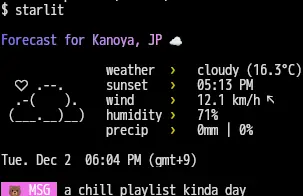
オプションや環境変数で都市を指定すると特定の都市が表示されます.
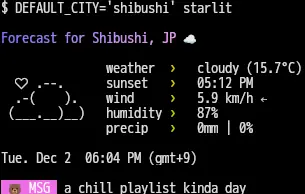
その他interactive mode も.
いつもは類似アプリとしてwego を利用することが多いのですがstarlit も良さそうです.天気プロバイダが増えると便利かもです.
環境
$ starlit --version

 V0.2.3  starlit version
$ dpkg-query -W pipx python3
pipx    1.8.0-1
python3 3.13.7-1
$ lsb_release -dr
Description:    Debian GNU/Linux forky/sid
Release:        n/a
$ arch
x86_64