
さくらのナレッジに軽量ActivityPub Server のsnac についての記事を寄稿しました.
ここに書かなかったsnac のことをいくつか書いていこうと思います.
今日はカスタム絵文字について.
ActivityPub 各インスタンスでよく使われているカスタム絵文字というものがあります.misskey.io なんかでは特に多用されているようです.
snac もカスタム絵文字に対応しています.
既定値で設定されているものとして例えばtoot 本文中に :-) と入力することで「🙂」が, :beer: と入力することで「🍺」が表示されます.他に :shrug2: で「¯\_(ツ)_/¯」なんでものも.でもこのあたりのUnicode絵文字などは日本語入力環境があるとあまり有り難みは感じなそうです.でも画像ファイルも利用できます.
自分で用意した絵文字を追加してみましょう.
カスタム絵文字を追加するにはsnac のデータディレクトリにある emojis.json を編集することでカスタマイズできます.
emojis.json の既定値はこんな感じです.
toot 本文中に記述するkey と,実際に評される値の組み合わせです.key は保管性を保つために : で囲むことが推奨されています.値は以下では数値文字参照及び文字列ですが,URL を指定することも出来ます.
{
":-)": "🙂",
":-D": "😀",
"X-D": "😆",
";-)": "😉",
"B-)": "😎",
">:-(": "😡",
":-(": "😞",
":-*": "😘",
":-/": "😕",
"8-o": "😲",
"%-)": "🤪",
":_(": "😢",
":-|": "😐",
"<3": "❤️",
":facepalm:": "🤦",
":shrug:": "🤷",
":shrug2:": "¯\\_(ツ)_/¯",
":eyeroll:": "🙄",
":beer:": "🍺",
":beers:": "🍻",
":munch:": "😱",
":thumb:": "👍"
}ここにsnac デフォルトアイコンを追加してみます.snac のベースurl の下の /susie.png (kagolug では https://snac.kagolug.org/susie.png )にアクセスするとsnac デフォルトアイコンのsusie が表示されます.これを利用してみます.

emojis.json を以下のように書き換えます.
     ":beer:": "🍺",
     ":beers:": "🍻",
     ":munch:": "😱",
-    ":thumb:": "👍"
+    ":thumb:": "👍",
+    ":susie:": "https://snac.kagolug.org/susie.png"
 }
Tip | emojis.json は保存した時点で内容が反映されます.中途半端な状態で保存すると全てのカスタム絵文字が利用できなくなったりするので注意しましょう. |
これで :susie: と入力することで が表示されるようになります.
更にペンギンのTux とタスマニアデビルのTuz を追加してみます.
アイコンの画像ファイルを用意し,静的環境に設置,そのurl をemojis.json ファイルに記述します.
今回以下のようになりました.
     ":beer:": "🍺",
     ":beers:": "🍻",
     ":munch:": "😱",
-    ":thumb:": "👍"
+    ":thumb:": "👍",
+    ":susie:": "https://snac.kagolug.org/susie.png",
+    ":tux:": "https://www.kagolug.org/snac-emoji/Tux.png",
+    ":tuz:": "https://www.kagolug.org/snac-emoji/Tuz.png"
 }
これで :susie:, :tux:, :tuz: の3つの絵文字が利用できるようになりました.
toot して確認できます.
もしくは以下のようなサイトでMastodon カスタム絵文字API経由で絵文字一覧を確認することも出来ます.
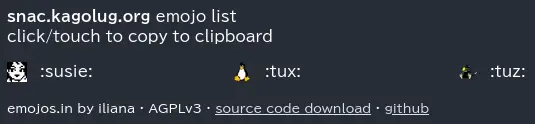 ]
]
snac のカスタム絵文字についての詳細はsnac(8) を参照してください.
Custom Emojis
    From version 2.51, support for customized Emojis in posts is available (previously, they were hardcoded). Emojis are read from the emojis.json file in the instance base directory, as a JSON object of key / value pairs (if this file
    does not exist, it will be created with the predefined set). Each key in the object contains the text to be found (e.g., the :-) for a smiling face), and its associated value, the text string that will replace it (in  this  example
    case, the HTML entity for the Unicode codepoint for the smiley or the Emoji itself as text).
Emoji values can also be URLs to image files; in this case, they will not be substituted in the post content, but added to the 'tag' array as an ActivityPub standard 'Emoji' object (it's recommendable that the Emoji key be enclosed in colons for maximum compatibility with other ActivityPub implementations, like e.g. :happydoggo:). These images can be served from an external source or from the static directory of the instance admin.If you want to disable any Emoji substitution, change the file to contain just an empty JSON object ({}).
「snac でカスタム絵文字を利用」への2件のフィードバック
Reposts